





- 未分類
Panopto .5のご紹介
本日、当社の動画プラットフォームの最新版をリリースしました。今回のバージョンでは、より洗練されたWeb UI、新しい一括アップロード機能、リモートレコーダーのアップデート、ADAおよびセクション508準拠に向けたアクセシビリティの改善、企業ポリシーに準拠するための新しいセキュリティオプション、そして録画品質の向上が図られています。
ユーザーインターフェースの簡素化
Panopto .5における最も目立つ変更点は、ビデオコンテンツ管理システム(VCMS)内のユーザーインターフェース(UI)の刷新です。メインコンテンツ画面のレイアウトを簡素化し、視認性を向上させるとともに、主要な製品機能へのアクセスを容易にしました。
例えば、VCMS画面の上部に「作成」ボタンを追加しました。これにより、新しい動画の録画、既存の録画データのアップロード、ウェブキャストの準備、録画のスケジュール設定、あるいは単に新しいフォルダを追加するといった操作を、製品内の1か所で行うことができます。
また、ビューアーに新機能を追加しました。1つ目は「10秒巻き戻し」ボタンで、見逃してしまった部分を簡単に再生して確認できるようになりました。 さらに、視聴者が動画の再生品質を自動または手動で選択できる機能も追加しました。視聴者の利用可能な帯域幅に応じて動画の品質が自動的に調整される「アダプティブストリーミング」は、デフォルトで有効になっています。これに加え、視聴者は「中」または「高」の品質を選択し、常にその品質で再生されるように設定できるようになりました。この機能は、高精細な映像をHD画質で視聴したい場合に最適です。
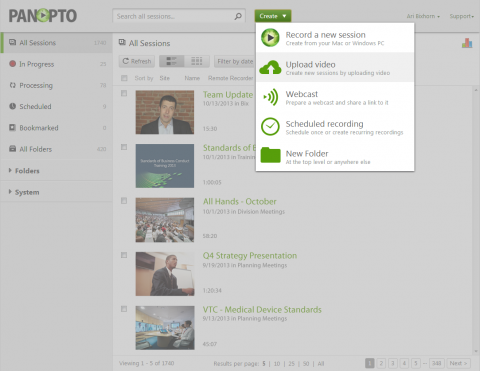
「作成」ボタンを使用すると、VCMSから最も一般的なタスクに簡単にアクセスできます
のバッチアップロード
Panopto .5の新機能として、複数の動画をWebインターフェースにドラッグ&ドロップするだけで一括インポートできるようになりました。これにより、既存の動画を一元管理し、検索可能にし、あらゆるデバイスで視聴できるようにすることが容易になります。Panopto 、.avi、.asf、.wmv、.mpg、.ps、.ts、.m2v、.mp2、.mod、.mp4、.m4v、.mov、.qt、.3gp、.flv、.f4v、.mp3、.wma、.m2a、.m4a、.f4aなど、幅広いファイル形式Panopto 。 サポートされているコンテナおよびコーデックの完全なリストについては、こちらをクリックしてください。

新しい「一括アップロード」機能を使って、最大100個のファイルを同時にアップロードできます
Remote Recorder ヘルスダッシュボード
今回のリリースでは、Remote Recorder のダッシュボードも刷新しました。新しいダッシュボードでは、組織全体のビデオインフラの稼働状況を1か所で確認できます。会議室、講堂、教室など、あらゆる場所にあるPanopto の映像および音声フィードをプレビューし、録画やライブ配信が正常に機能していることを確認できます。
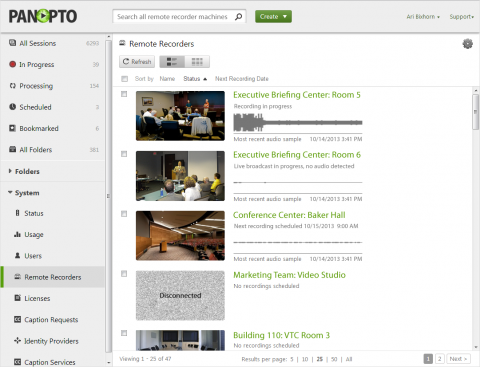
管理者は、1つのページ上で録画インフラ全体を俯瞰できます
視覚・聴覚障がい者向けのアクセシビリティ
今回のリリースでは、既存のADAおよびセクション508アクセシビリティ基準への対応をさらに拡充し、WebベースのビューアーおよびVCMSにおいて、キーボード操作によるアクセシビリティとスクリーンリーダーのサポートを追加しました。視覚障がいのある方は、最も普及している2つのスクリーンリーダーであるJAWSとNVDAを使用して、Panopto アクセスできるようになります。 聴覚障害をお持ちの方向けに、今回のリリースでは、Panoptoビデオポッドキャスト内にクローズドキャプション機能を導入しました。

Panopto 埋め込んでいる組織は、クローズドキャプションを活用することで、聴覚に障害のある方にもそれらの録画コンテンツを利用可能にできるようになりました
の録画品質
昨今、市場には数多くの動画キャプチャや画面録画ソリューションが溢れています。 私たちの目標は、最高品質のマルチトラック再生体験を提供できるソフトウェアをお届けすることです。そこで今回のリリースでは、Windowsレコーダーの最大動画録画解像度とフレームレートを向上させました。また、音量が小さすぎたりクリッピングが発生したりするのを防ぐためのオーディオゲインコントロールを追加しました。さらに、リモートレコーダーには動画品質設定を追加し、HD動画の録画やライブ配信のスケジュール設定や自動化が可能になりました。
セキュリティ
IT管理者向けに、組織のポリシーに準拠するため、今回のリリースで新しいセキュリティ機能を追加しました。まず、サイト全体のSSLがサポートされるようになり、Panopto通信が確実に暗号化されるようになりました。次に、Panopto 認証情報に対してパスワード要件を適用できるようになりました。例えば、大文字と小文字、特殊文字、数字を組み合わせたパスワードを必須とすることができます。また、過去のパスワードの再利用を防ぐために、パスワード履歴を管理することも可能です。 最後に、Panoptoすべての認証済みユーザー間で動画の共有を簡素化する「全ユーザー」アクセス制御リスト(ACL)を導入しました。
今後数週間のうちに、ホスティング版およびオンプレミス版をご利用のお客様向けに、Panopto .5の提供を開始いたします。今回のリリースにおける変更点の詳細については、このブログで随時更新される情報や動画をご確認ください!