




Moodle Integration
Complete Video Learning Platform for Moodle LMS with Panopto
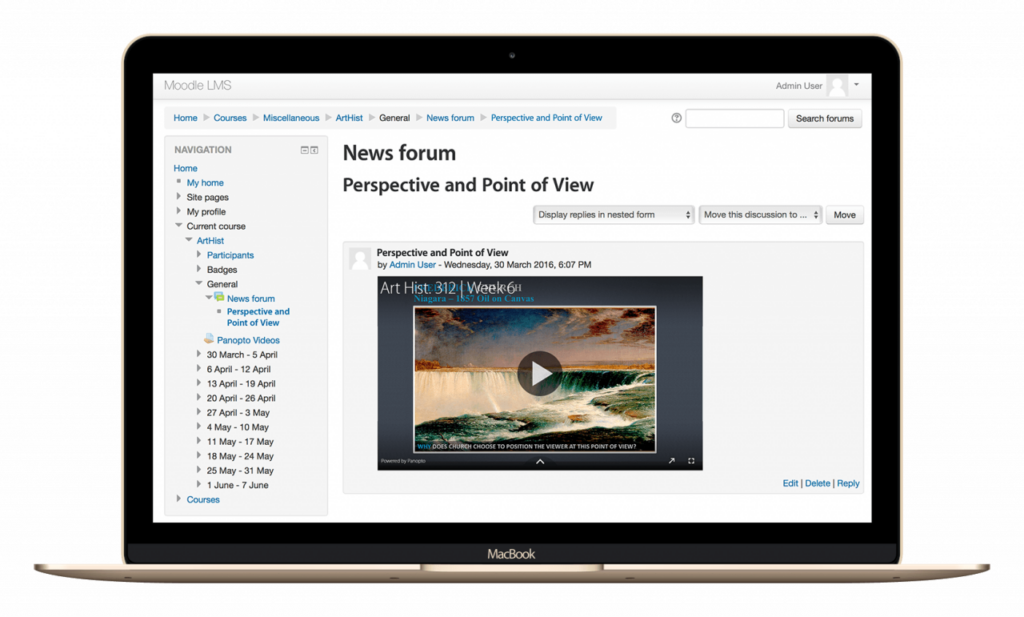
Videos embed directly into your Moodle courses. Students watch lectures, submit video assignments, and access course materials without leaving their LMS. No separate logins or platform switching.
Instructors record and share content through the same interface they use for everything else. Works for online courses, hybrid classrooms, or flipped learning models. The integration handles the technical complexity behind the scenes.
Why Choose Panopto’s Moodle Integration for Your Institution
Moodle and Panopto work together to make video as easy to use as any other course material. Lecture recordings, student projects, and training resources live in your LMS where everyone expects to find them.
Students search video content like they’d search course documents. Instructors track viewing analytics to see who’s watching and where they’re struggling. Video becomes part of your teaching toolkit, not a separate platform to manage.

How Panopto Enhances Teaching and Learning in Moodle

1. Native Video Integration with Secure Access
Panopto embeds directly into Moodle courses. Students access videos without leaving their course page or logging into a separate system. SSO authentication means they’re automatically recognized with the right permissions.

2. Automated Folder Creation for Each Course
Every Moodle course gets its own Panopto folder automatically. Instructors upload videos that only their enrolled students can see. No manual setup or folder organization needed.

3. Flexible Video Embedding Anywhere in the LMS
Drop videos into assignments, discussion forums, or lesson pages. Embed anywhere you can add content in Moodle. Videos play inline without redirecting students to another platform.

4. Secure Student Video Submissions
Students record and submit video assignments directly through Moodle. Submissions go to private folders only the instructor can access. Peer review settings let you control who sees which submissions.

5. Actionable Insights Through Viewing Data
See which students watched required videos and for how long. Identify learners who might be struggling based on low engagement. Completion data syncs back to Moodle gradebook if configured.

6. Accessibility Designed for Inclusive Learning
Automatic captions appear on every video for hearing-impaired students. Screen reader compatibility ensures students with visual impairments can navigate content. You meet accessibility requirements without extra work.

7. Privacy Controls and Role-Based Permissions
Moodle roles carry over to Panopto automatically. Teaching assistants get appropriate access without manual permission changes. Students only see videos for courses they’re enrolled in.

8. Ready to Scale for Any Moodle Deployment
Works with Moodle installations of any size, from small colleges to large university systems. Hundreds of courses can run simultaneously without performance issues. Your IT team configures once and it works across all courses.
Essential Features of Panopto’s Moodle Integration
| Feature | Description |
|---|---|
| LTI 1.3 + Moodle Plugin | Flexible deployment options across Moodle versions |
| SSO Integration | Instant access with Moodle user credentials |
| Search Inside Every Video Course | Quickly find specific information within lecture recordings and course content, including spoken words and on-screen text. |
| Auto-Mapped Course Folders | Synced with Moodle course shells |
| Embeddable Videos in All Course Areas | Including pages, forums, assignments, and quizzes |
| Student Assignment Submissions | Record/upload securely via Moodle |
| Automatic Captioning, Transcripts and Translations | Built-in ASR and support for human captions |
| Viewer Engagement Analytics | Track watch history and participation |
| Secure Role-Based Access | Tied directly to Moodle roles and permissions |
Streamlined Video Workflow for Enhanced Moodle Learning
- Faculty create content using Panopto’s browser-based or desktop recorder, or upload existing videos.
- Analytics, permissions, and advanced settings are easily managed centrally through Panopto.
- Faculty create content using Panopto’s desktop or browser-based recorder. Or upload existing videos.
- Videos can be added anywhere in Moodle: into topics, labels, discussion boards, or assessments.
- Students view content inline or submit videos as part of assignments, using the same login.
- Analytics, permissions, and captions are managed centrally through Panopto.
“The integration with Moodle was absolutely stunning. Recordings are available to students via Moodle as soon as they have processed.”
Lynette Sorenson, Education Technologist, Northwest University
Frequently Asked Questions
Does Panopto work with our current version of Moodle?
Panopto integrates with Moodle 3.5 and later versions. The integration works with both cloud-hosted and self-hosted Moodle installations. Check with Panopto support to confirm compatibility with your specific setup.
Do students need separate Panopto accounts?
No. Students access videos through Moodle using their existing credentials. SSO integration means they’re automatically authenticated. They never see a separate login screen.
Can we migrate existing course videos into the integration?
Yes. Bulk upload existing videos and organize them by course folder. Panopto can help migrate content from previous video platforms. Course associations are established during migration.
Does video watch data sync to the Moodle gradebook?
Video completion and engagement data can flow back to Moodle. Set up grade items tied to video completion. Students see their viewing progress reflected in the gradebook.
How much training do instructors need to use the integration?
Most instructors figure it out in one session. Recording and embedding videos takes just a few clicks. Panopto provides training resources, but the interface is designed to be intuitive for non-technical faculty.
What happens to course videos when students unenroll?
Students automatically lose access when they’re removed from a Moodle course. No manual permission changes needed. Videos remain in instructor folders for future semester use.
Are analytics available to instructors?
Yes. Educators can access metrics for each video, including who viewed, how long they watched, and where engagement dropped off.

Get Started with the Moodle Panopto Integration
Video is no longer optional: It’s a core part of how students learn. With the Moodle Panopto integration, your institution can deliver high-quality video learning experiences with minimal overhead. From automated lecture capture to interactive student assignments, Panopto helps Moodle do more with video. Securely and at scale.
Connect with us today to learn how to bring Panopto’s video platform to your Moodle environment.